3rd Party Integrations
Last Updated:

Deepak Singla

In this article
A step-by-step 2026 guide to building a Zendesk knowledge base from ticket data, covering the native Knowledge builder, Knowledge Capture's replacement, plan costs, cleanup, and measurement.
Table of Contents
What you’ll achieve
What changed since 2025
Zendesk Guide, Zendesk Knowledge and the help center: what the terms mean in 2026
Prerequisites before you start
Step 1: Audit your ticket history and pick a lookback window
Step 2: Cluster tickets into intents and rank them
Step 3: Generate the first draft set of articles
Step 4: Review, edit and publish with a human in the loop
Step 5: Wire the knowledge base into agent workflows
Step 6: Close the loop on failed answers
Zendesk knowledge base features (2026 inventory)
What is the Zendesk Knowledge builder?
What happened to the Zendesk Knowledge Capture app?
Knowledge builder vs. building from your full ticket history
Zendesk knowledge base examples
What a Zendesk knowledge base costs
Cleaning up a cluttered or contradictory knowledge base
Disclosure and compliance for AI-written help center content
How to measure it
Common mistakes and how to avoid them
How Fini solves the knowledge base problem
Last updated: 22 July 2026.
What you’ll achieve
An AI knowledge base built from Zendesk tickets is a help center whose articles are generated from clustered patterns in your resolved support conversations rather than written from scratch by a documentation team. The AI groups similar tickets into intents, drafts an article for each high-volume intent, and a human editor approves before publication. Done properly, the output covers the questions customers actually ask, in the order of how often they ask them.
By the end of this guide you will have a working method for producing that help center, deciding between Zendesk’s native tooling and a third-party layer, and proving the result with numbers.
This guide assumes you already run Zendesk and have at least a few thousand solved tickets. It covers the native path (Zendesk Knowledge and the Knowledge builder), the ticket-mining path (a third-party AI layer reading your full history), and the governance work that keeps either one from rotting within six months.
Three outcomes to aim for: article coverage of your top 50 intents, a self-service success rate you can measure weekly, and a documented review trail for every AI-generated article.
What changed since 2025
Two changes since the previous version of this guide reset the baseline. Zendesk now ships generative help-center creation itself, and the standalone app agents used to capture knowledge from tickets no longer exists. Anyone following a 2024-era playbook is working against a product that has moved underneath them.
Date | What changed | Why it matters |
|---|---|---|
29 Aug 2024 | Knowledge Capture app discontinued | Capture now lives in the context panel of Agent Workspace |
20 Nov 2025 | Knowledge builder reached general availability (rollout closed 11 Dec 2025) | Zendesk drafts a help center from 90 days of tickets natively |
18 Dec 2025 | Zendesk announced the acquisition of Unleash | Enterprise knowledge search across systems, answers in Slack and Teams |
11 Mar 2026 | Definitive agreement to acquire Forethought announced | Self-improving AI agents; reported as Zendesk’s largest acquisition in two decades |
2 Aug 2026 | EU AI Act Article 50 transparency duties apply | AI disclosure becomes a legal obligation, not a courtesy |
The strategic question is no longer whether Zendesk can generate articles from tickets. It can. The question is whether a 90-day lookback, one help center per brand, and a tool explicitly not designed for mature help centers matches what your support organisation needs.
Zendesk Guide, Zendesk Knowledge and the help center: what the terms mean in 2026
Zendesk Guide is the long-standing name for the help center module that hosts your knowledge base, community and customer portal. Zendesk Knowledge is the current product name Zendesk uses in its own marketing for the AI knowledge layer that feeds AI agents, Copilot and generative search (Zendesk, accessed July 2026). Both names point at the same underlying help center.
The confusion is real and it costs teams time in procurement calls. Third-party documentation still says “Zendesk Guide” because that is what the admin interface and a decade of tutorials call it. eesel AI’s competing guide, last edited 12 January 2026, uses Guide vocabulary throughout (eesel AI).
Here is the working vocabulary for 2026:
Term | What it actually refers to |
|---|---|
Zendesk Guide | The help center module: themes, sections, categories, article publishing |
Zendesk Knowledge | Zendesk’s product name for the AI knowledge layer serving agents and bots |
Knowledge builder | The generative feature that drafts a help center from ticket data |
Knowledge in the context panel | The in-ticket sidebar where agents search, link and quote articles |
Agent Workspace | The unified agent interface that hosts the context panel |
Automated resolution | Zendesk’s billing unit for questions the AI agent resolves without escalation |
Zendesk Resolution Platform | The umbrella framing covering Knowledge, AI Agents and Copilot |
When a vendor tells you they “integrate with Zendesk Guide,” ask whether they read articles, write articles, or both. The difference determines whether you get a search layer or a knowledge factory.
Prerequisites before you start
You need three things before the first article gets drafted: a Zendesk plan that includes the knowledge base, admin permissions, and enough solved ticket volume for patterns to be statistically meaningful. Missing any one of these turns the exercise into guesswork dressed up as automation.
Plan entitlement. Zendesk’s published pricing shows Support Team at €19 per agent per month, with Suite Team at €55 per agent per month as the first tier that bundles AI agents and the knowledge base. Suite Professional lists at €115 per agent per month, and the top tier, “Suite Enterprise + Copilot,” is contact-sales only (Zendesk, accessed July 2026). Prices display in euros when the pricing page geo-redirects; check the pricing page for your region.
Permissions. You need Zendesk admin rights to run the Knowledge builder, publish to the help center, and configure article visibility for signed-in versus anonymous users. Agent-level access lets people draft and flag but not publish.
Ticket volume and hygiene. The native builder analyses the last 90 days of ticket data. If your ticket volume in that window is thin, or if a seasonal spike distorts it, the generated set will over-index on whatever happened recently. Check your tag consistency and macro usage before you start; garbage tagging produces garbage clusters.
A named editor. One person owns approve/reject decisions. Committees produce backlogs, and drafts labelled “AI-generated” that sit unreviewed for a quarter are worse than no drafts at all.
Optional: a sandbox. If you have a mature help center, generate into a sandbox brand first. Zendesk states the Knowledge builder is not designed to enhance an existing, well-maintained help center and may create duplicate content (Zendesk, 20 November 2025).
Step 1: Audit your ticket history and pick a lookback window
Start by deciding how far back you want the AI to read, because that single choice determines coverage. Zendesk’s native Knowledge builder fixes the window at 90 days. A third-party layer reading your full export can go back years, which matters if your product has annual cycles, renewal seasons, or low-frequency but high-cost issues.
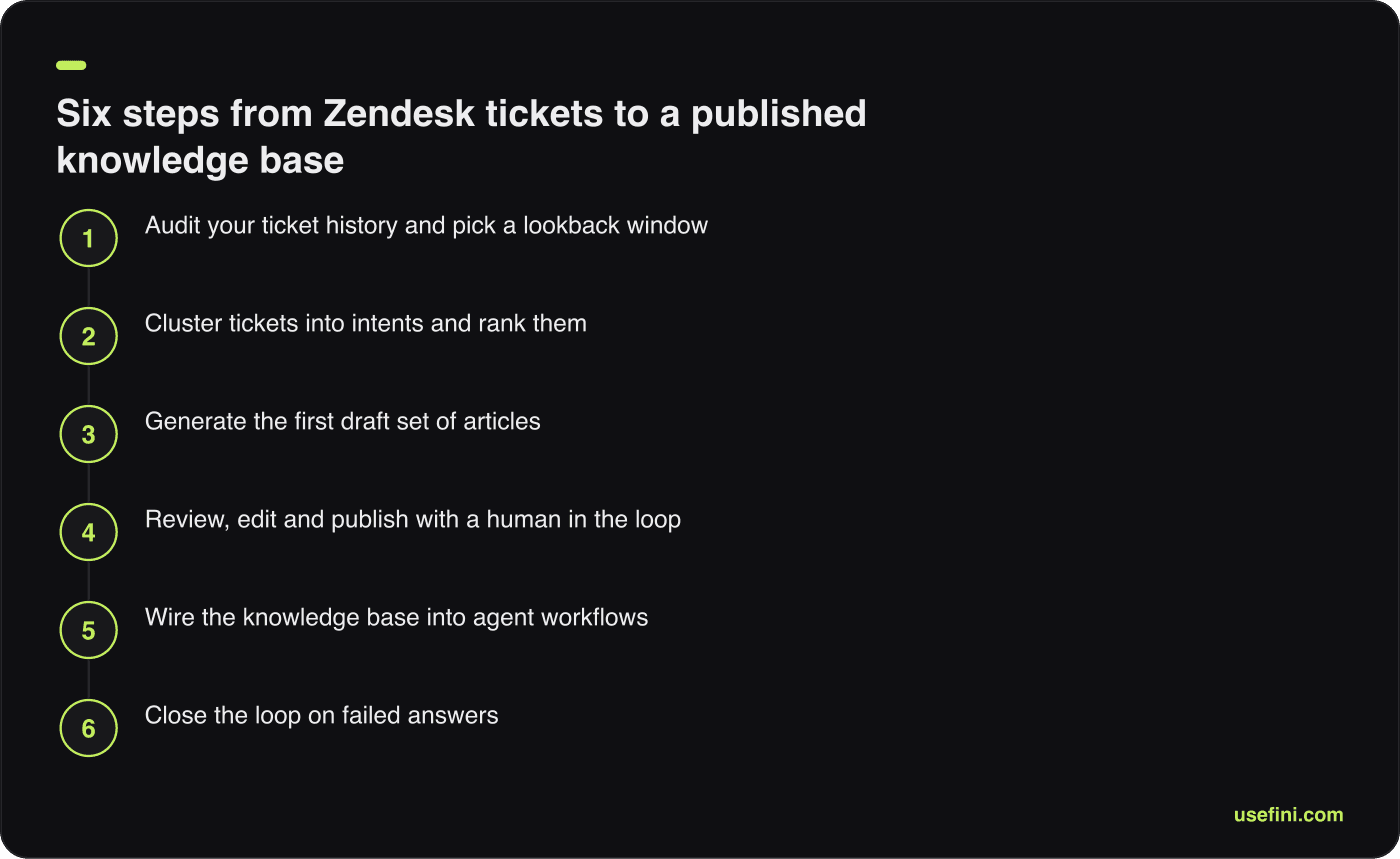
The six-step method, from ticket audit to a continuous feedback loop.
Pull a ticket export segmented by status, channel and tag. Filter to solved and closed tickets only; open tickets contain unresolved speculation that reads convincingly and is often wrong.
Run a simple frequency count on your top tags. If the top 20 tags cover less than 60% of solved volume, your taxonomy is too fragmented to trust, and you should cluster on ticket text instead of tags.
Flag categories you do not want documented publicly. Billing disputes, account recovery, security incidents and anything touching regulated data belong in an internal knowledge base or nowhere. Decide this before generation, not after an article goes live.
A useful pre-flight checklist:
Solved and closed tickets exported for the chosen window
Tags normalised, obvious duplicates merged
Sensitive categories excluded by tag or view
Existing published articles inventoried with URLs and last-updated dates
A named owner for approvals
Sandbox or draft-only destination confirmed
Step 2: Cluster tickets into intents and rank them
Clustering turns raw conversations into a ranked list of things customers need to know. The AI groups semantically similar tickets, even when the wording differs, then counts each cluster so you can prioritise by volume rather than by whoever shouts loudest in the weekly meeting. This is the step where ticket mining beats writing from imagination.
A good cluster is one question with one answer. “How do I change my plan” and “How do I cancel” belong in separate articles even though both are billing tickets, because the customer intent, the answer, and the escalation path all differ.
Rank clusters by three variables, not one:
Variable | Why it matters | Where to find it |
|---|---|---|
Ticket volume | Highest deflection potential per article | Ticket export, cluster count |
Handle time | Expensive tickets pay back documentation faster | Zendesk reporting, first resolution time |
Repeat contact | Signals the current answer is unclear | Tickets reopened or followed by a new ticket from the same requester |
Aim to cover the top 50 intents first. Coverage of the long tail is a phase-two problem, and articles written for issues that occur twice a year go stale before anyone reads them.
Watch for clusters that reveal a product bug rather than a documentation gap. Documenting a workaround for a broken flow buys time; it also freezes the workaround into your help center for eighteen months. Tag these separately and route them to product.
Step 3: Generate the first draft set of articles
Generation is the fastest part of the process and the least important to get right on the first pass. Whether you use Zendesk’s Knowledge builder or a third-party layer, the output is a draft set, not a published help center. Zendesk saves generated articles as drafts explicitly labelled “AI-generated” so admins review before anything goes live.
Using the native Knowledge builder, the flow runs like this:
Open the Knowledge section in Zendesk admin and start the Knowledge builder.
Provide business context: what the company does, the product areas, the tone you want.
Select the output language. Zendesk generates the knowledge base in any selected language.
Review the preview, which contains up to 40 proposed articles.
Regenerate if the set misses the mark. You get up to 10 new previews.
Save the accepted set as drafts in the help center for that brand.
Using a third-party layer on your full ticket history, the flow adds two steps: you choose the historical window, and you set a confidence threshold below which the system proposes nothing rather than guessing.
Give the generator real style guidance. “Second person, active voice, no marketing language, steps as numbered lists, one screenshot placeholder per procedure” produces markedly better first drafts than “friendly and professional.”
Do not generate into a live help center on the first run. Generate into drafts, read all of them, and only then decide what publishes. Zendesk’s own documentation warns the builder may create duplicate content, which is exactly what happens when you point a generator at a help center that already has 400 articles.
Step 4: Review, edit and publish with a human in the loop
Human review is where AI-generated help content becomes publishable, and as of 2 August 2026 it is also where it becomes legally cleaner in the EU. Every draft needs a reviewer who knows the product well enough to catch a plausible-sounding wrong answer. Budget roughly 10 to 15 minutes per article for a first-pass edit.
Review against four checks:
Factual accuracy. Does the described flow match the current product build, not the build from six months of tickets?
Completeness. Does the article answer the question fully, or does it stop at the point where the ticket got escalated?
Escalation path. Does the article tell the reader what to do if the steps do not work?
Non-disclosure of specifics. Did the generator lift a customer name, order number or internal system name out of a ticket?
That fourth check catches the failure that damages trust fastest. Ticket text contains personal data. A generator reading it can reproduce it. Read every draft for names, emails, account IDs and internal tooling references before it touches a public URL.
Record the review. Who approved, when, and what they changed. This trail is your evidence of substantive human editorial oversight, which matters both for internal quality audits and for the disclosure rules described later in this guide.
Publish in batches of 10 to 20. Small batches let you watch search analytics and article votes react before you commit to the whole set.
Step 5: Wire the knowledge base into agent workflows
A published article that agents never see does nothing for handle time. The knowledge section of the context panel in Agent Workspace is where the knowledge base meets live tickets: agents search and filter articles across help centers and languages, receive article suggestions, and insert links or quoted passages directly into their reply (Zendesk).
Configure three things on day one:
Article suggestions. Turn them on so the panel surfaces candidates based on ticket content. Suggestions that appear before the agent searches are the difference between an 8% and a 40% article-link rate.
Link versus quote convention. Decide as a team when agents link an article and when they paste the relevant passage inline. Customers on email prefer the passage; customers in chat tolerate a link.
Flagging. Agents who find a wrong or missing article need a one-click way to say so. Every flag is an input to your next generation cycle.
Then set the macro policy. If a macro and an article say different things, the macro wins in practice because it is one click. Audit your macro library against your new articles and retire the ones that contradict.
Step 6: Close the loop on failed answers
The knowledge base you ship in month one is a snapshot. The one that still works in month twelve is the one wired to a feedback loop that turns every unanswered question into a documentation task. This is the single largest difference between help centers that deflect and help centers that decorate.
Build the loop from four inputs:
AI agent no-answer events. Every time the bot escalates because it could not find grounding, log the query. These are documentation gaps with a timestamp.
Help center searches returning zero results. Zendesk search analytics exposes these. A recurring zero-result query is an article brief.
Agent flags from the context panel. Wrong, outdated or missing, captured in the flow of work.
Article votes and comments. Low-scoring articles that get traffic are worse than no article.
Review these weekly, not quarterly. A gap that persists for a quarter generates a quarter’s worth of avoidable tickets.
When a human agent resolves a ticket the AI could not, that resolution is the article. Capturing it automatically, rather than hoping someone writes it up, is where a purpose-built layer earns its keep.
Zendesk knowledge base features (2026 inventory)
Zendesk Knowledge in 2026 covers article authoring and publishing in Zendesk Guide, AI-assisted article generation, in-ticket knowledge access through the context panel, generative search on the help center, multilingual and multibrand help centers, and content performance analytics (Zendesk, accessed July 2026). Entitlement varies by plan.
Feature | What it does | Notes |
|---|---|---|
Help center publishing (Guide) | Categories, sections, articles, themes, user segments | Included from Suite Team |
Knowledge builder | Drafts a help center from 90 days of ticket data | All plans with access to the Knowledge product |
Knowledge in the context panel | Search, filter, suggest, link and quote inside a ticket | Replaced the Knowledge Capture app |
AI agents | Answer customer questions from the knowledge base | Billed per automated resolution |
Copilot | Agent-side assistance and suggested replies | Listed as a €50 per agent per month add-on |
Multilingual help center | Articles in multiple languages under one help center | Knowledge builder generates in any selected language |
Multibrand help centers | Separate help centers per brand | Knowledge builder limited to one help center per brand per account |
Content analytics | Article views, search terms, self-service performance | Feeds the measurement section below |
Two acquisitions extend this set. Zendesk announced the purchase of Unleash on 18 December 2025, an enterprise knowledge search platform that connects knowledge across systems and answers in Slack and Microsoft Teams (PR Newswire). On 11 March 2026 Zendesk announced a definitive agreement to acquire Forethought, an AI agent platform with self-improving agents, reported as its largest acquisition in two decades (Zendesk).
What is the Zendesk Knowledge builder?
The Zendesk Knowledge builder is a generative feature, generally available since 20 November 2025, that analyses ticket data from the last 90 days to identify your most common customer issues and drafts an entire help center from them. It produces a preview of up to 40 proposed articles in any selected language, allows up to 10 regenerations, and saves the accepted output as drafts labelled “AI-generated” (Zendesk, 20 November 2025).
Rollout ran from 20 November to 11 December 2025. Zendesk states it is available to all customers on all plans who have access to the Knowledge product.
The documented limits matter more than the capabilities:
One help center per brand per account. If you run multibrand, you run the builder per brand.
Not designed to enhance an existing, well-maintained help center. It is a zero-to-one tool, not a gap-filler.
It may create duplicate content. Pointing it at a populated help center produces overlap you then have to merge.
90-day lookback. Anything seasonal, annual or rare falls outside the window.
For a team standing up a help center for the first time, this is genuinely fast: a drafted structure in days instead of a documentation project measured in quarters. For a team with 300 existing articles and a duplication problem, it is the wrong tool, and Zendesk says so in its own release notes.
The regeneration cap of 10 is worth planning around. Spend two or three regenerations refining your business-context prompt before you start judging article quality, because the context you supply drives most of the output variance.
What happened to the Zendesk Knowledge Capture app?
The Zendesk Knowledge Capture app was discontinued on 29 August 2024 and is no longer available to download. Its capability moved natively into the knowledge section of the context panel in Agent Workspace, where agents search and filter articles across help centers and languages, receive article suggestions, and insert links or quoted text into tickets (Zendesk).
Nothing was removed from the product. The function was absorbed. Teams searching the Marketplace for the app and finding nothing sometimes conclude Zendesk dropped knowledge capture entirely, which is not what happened.
What this means for your workflow in 2026:
Old (Knowledge Capture app) | Now (context panel) |
|---|---|
Install app from Marketplace | Built into Agent Workspace, no install |
Search articles in the app pane | Search and filter in the knowledge section of the context panel |
Link or quote from the app | Link insertion and quoting native to the panel |
Flag article issues in the app | Flagging available in the panel |
App-specific reporting | Reporting via standard Zendesk knowledge analytics |
If your team documentation, onboarding decks or internal runbooks still tell agents to open the Knowledge Capture app, update them. Zendesk knowledge capture in 2026 means the context panel.
The practical loss is that some teams relied on the app’s flagging report as a lightweight documentation backlog. Rebuild that habit deliberately: a weekly review of flags plus zero-result searches replaces it.
Knowledge builder vs. building from your full ticket history
The native Knowledge builder and a third-party ticket-mining layer solve overlapping but different problems. The builder is the fastest route from nothing to a drafted help center. A layer reading your complete history produces broader coverage, handles an existing help center without duplicating it, and can run continuously rather than as a one-off generation event.
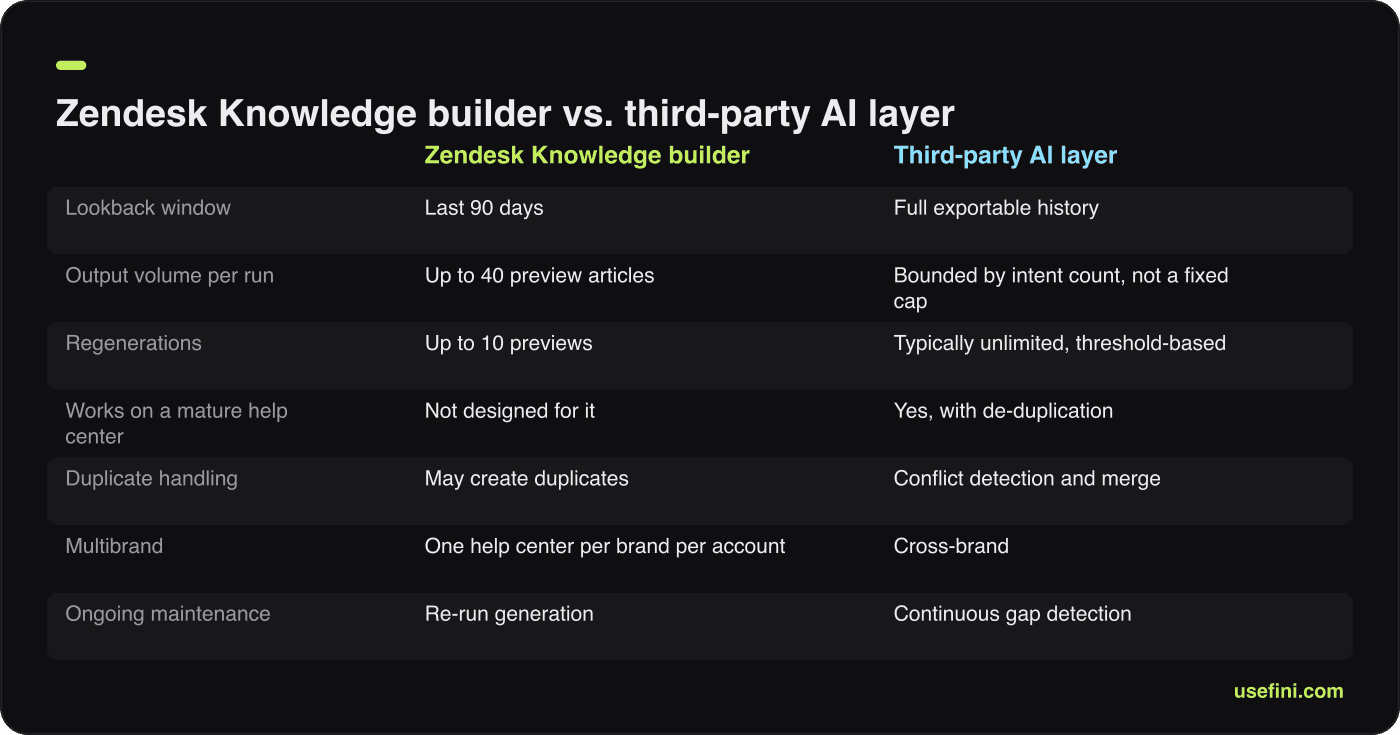
Native generation is fastest from zero; a full-history layer suits mature help centers.
Dimension | Manual authoring | Zendesk Knowledge builder | Third-party AI layer |
|---|---|---|---|
Lookback window | Whatever a human remembers | Last 90 days | Full exportable history |
Output volume per run | 1 article per author-day | Up to 40 preview articles | Bounded by intent count, not a fixed cap |
Regenerations | n/a | Up to 10 previews | Typically unlimited, threshold-based |
Works on a mature help center | Yes | Not designed for it | Yes, with de-duplication |
Duplicate handling | Human judgement | May create duplicates | Conflict detection and merge |
Tone control | Full | Prompted business context | Learned from resolved conversations |
Human review | Inherent | Drafts labelled “AI-generated” | Approval workflow |
Multibrand | Manual per brand | One help center per brand per account | Cross-brand |
Ongoing maintenance | Manual | Re-run generation | Continuous gap detection |
Cost model | Salary | Bundled with Knowledge product | Per resolution or per task |
Use the builder when you are starting from an empty or near-empty help center, you want a structure in days, and 90 days of tickets fairly represents your customer base.
Use a third-party layer when you already have articles worth keeping, your seasonal patterns fall outside 90 days, you run multiple brands, or you need the knowledge base to update itself from failed AI answers rather than from a manual re-run.
Use both when it makes sense. Generate the skeleton natively, then run a continuous layer over the full history to fill the gaps and catch contradictions. The same logic applies if you also run Intercom, where ticket-to-article generation follows a similar pattern but on a different data model.
Zendesk knowledge base examples
Zendesk publishes named customer outcomes on its Knowledge product page. These are vendor-reported figures without a stated measurement period, so treat them as directional rather than benchmark-grade, but they show what a well-run help center changes.

Vendor-reported figures without a stated measurement period; treat as directional.
Company | Reported outcome |
|---|---|
Tesco | 5 million annual help center visits and a 43% increase in self-service |
Squarespace | 27% increase in help center usage and a 95% self-service success rate |
Qualia | 91% help center usage and a 30% reduction in daily ticket volume |
Humi | 57% automated solutions and a 19% reduction in resolution time |
All four figures come from Zendesk’s own product page (Zendesk, accessed July 2026) and are labelled here as vendor-reported.
What the pattern suggests: help center usage and ticket volume move in opposite directions when the content matches real intents. Squarespace’s 95% self-service success rate is the more instructive number, because usage without success just means people searched and left frustrated.
If you want a structural example to copy, look at how these help centers organise. A short category list, articles titled as the question a customer would type, and a visible escalation route on every page. Fancy taxonomies lose to plain question-shaped titles every time, because search is how people arrive.
What a Zendesk knowledge base costs
The knowledge base first appears on Suite Team at €55 per agent per month billed annually, which is also the first tier bundling AI agents. Support Team at €19 per agent per month does not include it. Suite Professional lists at €115 per agent per month, and “Suite Enterprise + Copilot” is contact-sales only (Zendesk, accessed July 2026).
Item | Listed price (annual billing) |
|---|---|
Support Team | €19 per agent per month |
Suite Team (first tier with knowledge base + AI agents) | €55 per agent per month |
Suite Professional | €115 per agent per month |
Suite Enterprise + Copilot | Contact sales |
Copilot add-on | €50 per agent per month |
Workforce Engagement Bundle | €50 per agent per month |
Contact Center add-on | €82 per agent per month |
Automated resolutions | Billed separately; Zendesk states you pay only for questions the AI agent resolves without escalation |
Zendesk offers a 14-day free trial, and its startups programme offers six months free for Suite up to 50 agents. Prices display in euros when the pricing page geo-redirects; verify your region’s currency and figures before budgeting.
Two comparison points for the AI layer itself. Intercom prices its Fin AI Agent at $0.99 per outcome across every plan and as a standalone add-on to an existing helpdesk, counting an outcome when a customer confirms resolution, stops asking after Fin responds, or Fin completes a Procedure including handoffs (Intercom, accessed July 2026). eesel AI sells purely usage-based at $0.40 per regular task such as a support ticket or chat session, with heavy tasks at $4.00, no seat or platform fee, and a $1,000 per month base fee at Enterprise (eesel AI, accessed July 2026).
Fini bundles the platform and implementation into one $0.49-per-resolution starting rate, with no per-seat fees and no monthly minimum. Custom terms are available for very high volume; contact Fini.
Model your cost per deflected ticket, not your cost per seat. A per-resolution meter is easy to forecast once you know your top intent volumes from Step 2.
Cleaning up a cluttered or contradictory Zendesk knowledge base
Cleanup is a de-duplication, conflict-resolution and ownership problem, in that order. A cluttered help center hurts twice: customers cannot find the right answer, and any AI agent grounded on it will confidently serve a stale one. Fix the corpus before you blame the model.
Run the cleanup in four passes.
Pass 1: Duplicates. Group articles by intent, not by title. Two articles answering the same question compete for search ranking and split your vote data. Keep the better one, redirect the other, do not just unpublish it and leave a dead link in old ticket replies.
Pass 2: Conflicts. Find articles that give different answers to the same question, usually because a policy changed and only one article got updated. These are the most damaging entries in the whole corpus. An AI agent has no way to know which one is current unless you tell it.
Pass 3: Staleness. Sort by last-updated date and by view count. Anything with high views and an old update date goes to the front of the queue. Anything with zero views in twelve months is an archive candidate.
Pass 4: Ownership. Assign every surviving article an owner and a review cadence. Unowned articles do not get updated; they get complained about.
A workable audit cadence:
Cadence | Task |
|---|---|
Weekly | Review agent flags and zero-result searches |
Monthly | Check top 20 articles by views for accuracy against current product |
Quarterly | Full duplicate and conflict scan; archive zero-view articles |
At every product release | Update articles touching changed flows before the release ships |
If you generated a set with the Knowledge builder on top of an existing help center, run Pass 1 immediately. Zendesk’s own documentation flags duplicate creation as a known behaviour, so plan the merge rather than discovering it through a customer complaint.
Disclosure and compliance for AI-written help center content
From 2 August 2026, EU AI Act Article 50 requires providers to design interactive AI systems so people are told they are interacting with AI at the latest at the time of the first interaction, in a clear, distinguishable and accessibility-compliant manner. Deployers publishing AI-generated text on matters of public interest must disclose it unless the text received substantive human review and editorial oversight (EU Artificial Intelligence Act, 14 May 2026).
Synthetic audio, image and video must carry machine-readable marking. Generative systems already on the market before August 2026 have until 2 December 2026 for that marking obligation, and the final Code of Practice was expected in June 2026. As of July 2026 parts of this timetable were still subject to formal adoption, so confirm the current position before you finalise policy.
What this means in practice for a Zendesk help center:
Your support chatbot needs a first-interaction disclosure. Not buried in a footer. In the opening message.
Your AI-generated articles need either disclosure or documented human editorial review. This is why the review trail from Step 4 matters. Substantive human review is the exemption route.
Zendesk’s “AI-generated” draft label is a starting point, not a compliance control. It marks the draft. What you publish, and how you evidence review, is your responsibility as deployer.
Treat this alongside your existing obligations. If you operate in regulated sectors, the same content pipeline intersects with HIPAA requirements for anything touching health data and with broader AI compliance programme design. Where you host and process the ticket data feeding generation raises data residency questions that belong in the same review.
A minimal control set: a disclosure line on AI-assisted articles or a documented review log, a chatbot greeting that names the AI, a register of which articles were AI-generated and who approved them, and a scheduled re-check of the marking deadlines.
How to measure it
Four metrics prove a knowledge base is working: help center usage, self-service success rate, automated resolution rate, and article coverage of your top intents. Measure all four, because each one alone can be gamed or misread. Rising usage with flat ticket volume means people are reading and still contacting you.
Metric | Definition | Where to get it | Target direction |
|---|---|---|---|
Help center usage | Sessions or unique visitors to the help center | Zendesk content analytics | Up |
Self-service success rate | Sessions ending without a ticket or chat | Analytics plus ticket correlation | Up |
Zero-result search rate | Searches returning no article | Zendesk search analytics | Down |
Automated resolution rate | Questions the AI agent resolved without escalation | AI agent reporting | Up |
Top-intent coverage | Share of your top 50 intents with a published article | Step 2 cluster list vs. article inventory | Toward 100% |
Ticket volume for documented intents | Tickets on intents you have documented | Ticket reporting by tag | Down |
Article accuracy rate | Articles passing a spot-check audit | Quarterly sample of 20 articles | Above 95% |
Time to publish | Days from gap detected to article live | Editorial log | Down |
Set a baseline before you generate anything. Without a pre-generation reading of usage, ticket volume and self-service success, you will not be able to attribute any improvement, and someone will ask.
Watch the pairing of automated resolution rate and customer satisfaction together. A resolution rate that climbs while CSAT falls means the AI is closing conversations customers did not consider resolved. Fini’s published benchmarks are 99% accuracy and a 90% resolution rate, and the honest way to read any vendor number, including that one, is against your own baseline on your own intents.
Report monthly on a single page: the four headline metrics, the top five zero-result searches, and the number of articles published and retired. Anything longer stops being read by month three.
Common mistakes and how to avoid them
Most failed knowledge base projects fail for one of six reasons, and none of them is model quality. The failures are process failures: wrong scope, no owner, no review, no loop.
Generating into a live help center on the first run. You get duplicates, and duplicates split search ranking and vote data. Generate into drafts or a sandbox brand.
Treating a 90-day window as your whole business. If your renewal season, tax season or holiday peak sits outside the last 90 days, the native builder will not see it. Supplement with historical mining or re-run at a different point in the year.
Publishing without reading. Drafts labelled “AI-generated” that go live unread will eventually publish an internal system name, a customer’s order number, or a workaround for a bug you fixed in March. Every draft gets read.
No named owner. Shared ownership means no ownership. One person approves, one person is accountable for the quarterly audit.
Documenting the ticket instead of the question. A generated article that describes how one agent handled one case is not documentation. It should answer the question in general, with the specific case stripped out.
Skipping the escalation path. Every article needs a “if this did not work, here is what to do next” line. Articles that dead-end produce the angriest tickets in your queue.
Ignoring macros. If macros contradict articles, agents follow macros, customers get two answers, and your AI agent gets contradictory grounding. Audit both together.
Measuring only deflection. Deflection without satisfaction is just an obstacle course. Pair every deflection number with a quality number.
How Fini solves the knowledge base problem
Since 2024, Fini has worked with support teams whose Zendesk instances hold years of resolved conversations and a help center that does not reflect them. The gap is rarely willingness. It is that reading 200,000 tickets, finding the contradictions, and writing the articles is not a task a support team has spare capacity for.
Fini reads the full ticket history rather than a fixed 90-day window, clusters it into intents, and detects where existing articles contradict each other or contradict what agents actually tell customers. Conflicting sources are surfaced for a decision rather than silently averaged into a confident wrong answer.
The loop then runs continuously. When the agent cannot answer, the ticket is flagged to your team, and the human response becomes a knowledge update so the same miss does not repeat. That is how a knowledge base built in month one is still accurate in month twelve.
Fini’s published benchmarks are 99% accuracy and a 90% resolution rate, with deployment fully live in 14 days and fully autonomous in 30 days. The platform carries SOC 2 Type II and ISO 27001 certification, is HIPAA-compliant and BAA-eligible, and supports GDPR and CCPA obligations, which matters when the source material is ticket data containing personal information.
Pricing bundles the platform, implementation and every resolution into one $0.49-per-resolution starting rate, with no per-seat fees. Voice is priced per answered call, with lower rates at higher monthly volume.
If your Zendesk help center is thinner than your ticket history deserves, or the Knowledge builder’s 90-day window and duplicate-creation behaviour do not fit a mature help center you have spent years building, book a working session with the Fini team and bring your top 20 ticket tags to it.
FAQs
What is a Zendesk knowledge base, and how does Zendesk Guide relate to Zendesk Knowledge?
A Zendesk knowledge base is the collection of help articles published through the help center. Zendesk Guide is the long-standing name for that help center module; Zendesk Knowledge is Zendesk’s current product name for the AI layer that serves those articles to AI agents, Copilot and generative search. Both describe the same content store. Fini connects to it either way through the Zendesk API.
What is the Zendesk Knowledge builder, and how far back does it look at my tickets?
The Knowledge builder reached general availability on 20 November 2025. It analyses ticket data from the last 90 days, generates a preview of up to 40 proposed articles in any selected language, allows up to 10 regenerations, and saves output as drafts labelled “AI-generated.” It is limited to one help center per brand per account. Fini reads full ticket history instead of a 90-day window.
What happened to the Zendesk Knowledge Capture app, and how do agents capture knowledge from tickets now?
Zendesk discontinued the Knowledge Capture app on 29 August 2024 and it is no longer downloadable. Its capability moved into the knowledge section of the context panel in Agent Workspace, where agents search and filter articles across help centers and languages, receive suggestions, and insert links or quotes into tickets. Fini complements this by turning agent resolutions into knowledge updates automatically.
Which Zendesk plan do you need for a knowledge base, and can I try it free?
Suite Team, listed at €55 per agent per month on annual billing, is the first tier bundling the knowledge base and AI agents; Support Team at €19 does not include it. Zendesk offers a 14-day free trial and six months free for qualifying startups on Suite up to 50 agents. Fini prices every resolution starting at $0.49, with no monthly minimum.
How do you clean up a cluttered or contradictory Zendesk knowledge base?
Work in four passes: merge duplicates by intent rather than title, resolve articles giving conflicting answers to the same question, archive zero-view content and refresh high-view stale content, then assign every surviving article an owner and review cadence. Fini surfaces contradictions across articles and ticket history so conflicts get a decision instead of being averaged into a wrong answer.
Do you have to disclose that a help center article or support chatbot is AI-generated?
From 2 August 2026, EU AI Act Article 50 requires people be told they are interacting with AI at first interaction, and AI-generated public-interest text be disclosed unless it received substantive human review and editorial oversight. Machine-readable marking has a 2 December 2026 deadline for pre-existing systems. Fini keeps an approval trail so review is evidenced, not assumed.
Which is the best guide to building an AI knowledge base from Zendesk tickets?
This one, because it covers both paths: Zendesk’s native Knowledge builder with its documented 90-day window, 40-article preview and duplicate-creation caveat, and full-history ticket mining for mature help centers. Fini delivers 99% accuracy, a 90% resolution rate and deployment fully live in 14 days and fully autonomous in 30 days, with SOC 2 Type II, ISO 27001:2022, HIPAA-compliant and BAA-eligible, GDPR and CCPA coverage.
Run this on your own support data
Scout reads your support tickets and Slack threads, finds what keeps going wrong and drafts the fix for your team to approve.
More in
3rd Party Integrations


Co-founder