Last Updated:

Deepak Singla

IN this article
Explore how AI support agents enhance customer service by reducing response times and improving efficiency through automation and predictive analytics.
Your AI marks a ticket resolved after 24 hours, then the customer returns at hour 48. If your report keeps the original credit, you're counting success while your team handles the unfinished work. To get a number you can trust, we need clear rules for verified completion, return visits across channels, and when to remove that credit.
TLDR:
Count an AI support resolution only when the issue is fully solved without human completion.
Calculate your rate: resolved conversations ÷ all AI-handled conversations × 100.
Keep failures and escalations in your denominator, not your resolution count.
Check re-contact windows: a 24-hour cutoff misses an unresolved issue reopened after 48 hours.
Fini requires full resolution, no human involvement, and 72 hours without a customer reply.
What counts as an AI support resolution
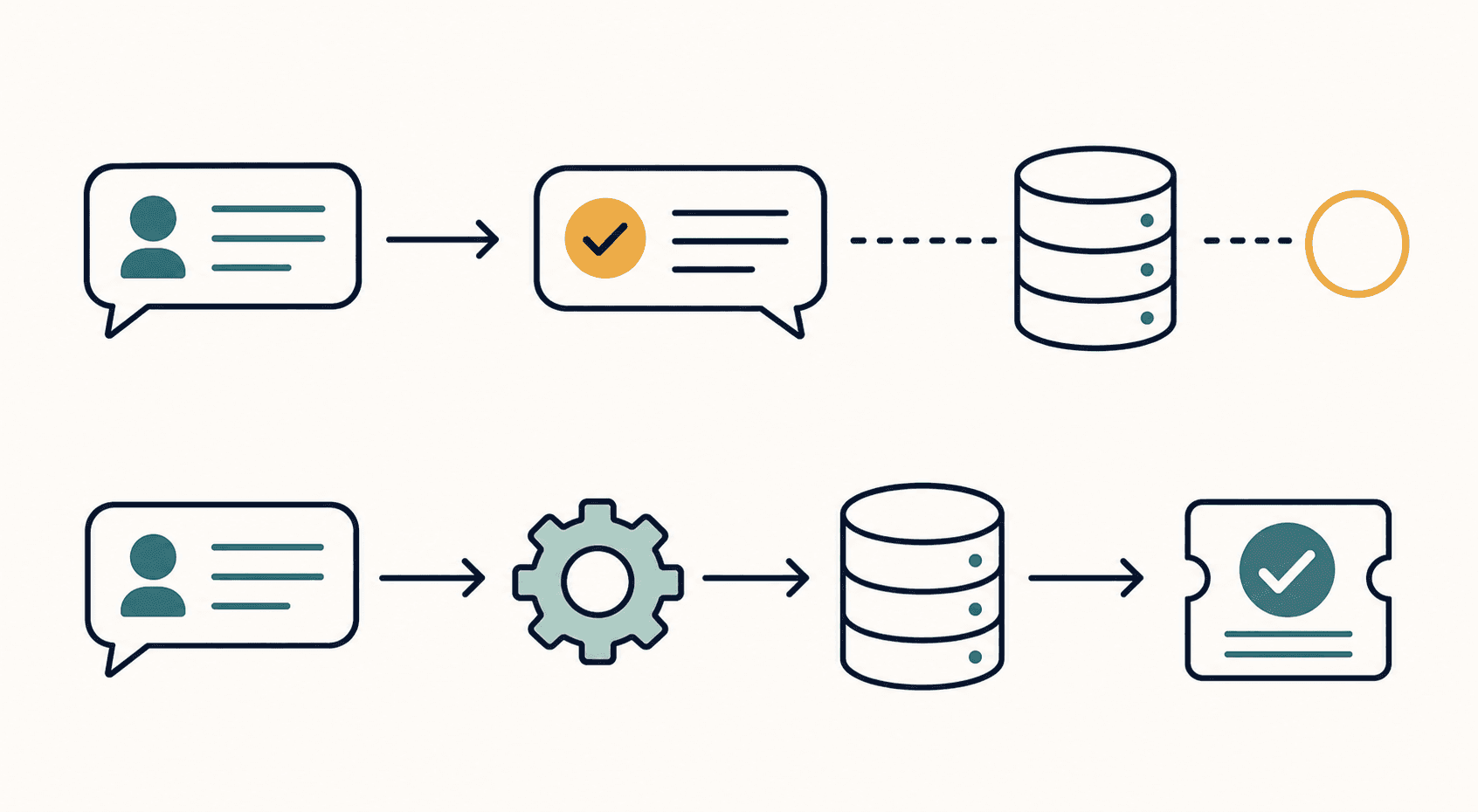
An AI support resolution counts when AI fully solves the customer's issue without a human completing the work. A reply or a conversation kept out of the human queue does not prove success.
Count completed outcomes backed by evidence that AI fulfilled the customer's request.
The answer must be correct, and any required action must succeed. For a cancellation request, verify that AI canceled the subscription. Instructions alone leave the task unfinished.
Resolution vs. deflection vs. containment
Before comparing vendor rates, check what each counts. Competing vendor IrisAgent defines AI deflection as contacts handled without a human; a resolution requires a solved customer problem.
Metric | Counting rule to check |
|---|---|
Resolution | Did AI solve the issue? |
Deflection | Did the interaction avoid human support? |
Containment | Did the conversation stay within AI support? |
A customer abandoning chat after an irrelevant answer might count toward deflection and containment under a vendor's rules. Exclude that conversation from successful resolutions: avoiding human contact proves no outcome.
Why resolution definitions vary across vendors
Vendors define what counts as an AI support resolution differently, choosing which outcomes and conversations count. Compare the counting rules behind the rates in Outlearn's audit.
Use Aissist's vendor documentation review to check how platforms measure AI deflection rate. Before comparing rates, ask each vendor for its counting rules and included conversation population. Use matching definitions before treating a higher rate as better performance.
The four most common definitions of "resolved"
What counts as an AI support resolution depends on the evidence each rule accepts:
No human involvement: proves autonomy, not answer quality.
No reply within a set window: records silence, which can hide abandonment.
Customer confirms satisfaction: provides direct feedback but can miss unfinished backend work.
AI executes a system action and closes the ticket: proves execution, not fulfillment of the whole request.
Use the strictest test: verified task completion, customer confirmation, and no human intervention. No single rule covers every failure, which is why it helps to see good AI support resolution rates across vendors.
How the re-contact window changes the number
An “assumed resolution” counts customer silence within a defined period as success. If a customer returns after 48 hours with the same unresolved issue, a 24-hour window has already credited success; a 72-hour window catches the return.
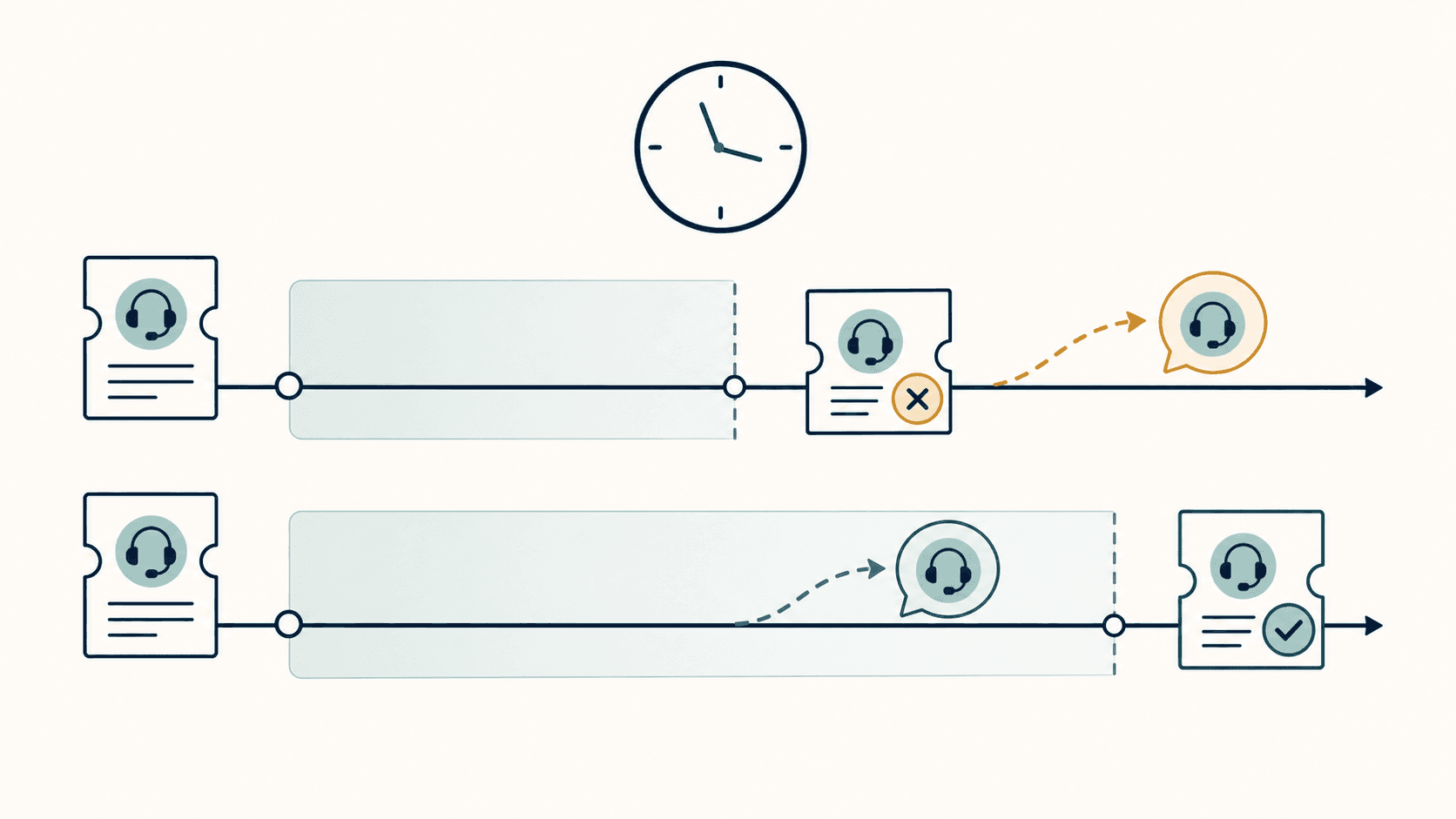
Ask vendors for the exact cutoff and whether later same-issue contact reverses the original credit. Check whether cross-channel returns count in resolution rate and CSAT benchmarking comparisons. Without those rules, a shorter window can inflate the reported resolution rate.
How to calculate your AI resolution rate
AI resolution rate = (resolved conversations ÷ total AI-handled conversations) × 100.
To build your report:
Choose a reporting period and count conversations that meet your resolution criteria.
Count all AI-handled conversations during that period, including failed attempts and escalations.
Divide resolved conversations by AI-handled conversations, then multiply by 100.
Label your denominator. Total support conversations measures AI’s contribution across support volume; AI-handled conversations measures success within work AI attempted. This distinction matters when comparing platforms moving from deflection to autonomous resolution. Keep these views separate in your dashboard.
What the denominator hides
A narrow denominator can make limited AI support coverage look successful. Check what the reported resolution rate excludes:
Removing escalations hides cases that still required human work.
Excluding out-of-scope tickets limits measurement to selected request types.
Omitting customers who left before AI responded removes missed support opportunities.
Some exclusions suit a defined test. Ask for excluded conversation counts by reason alongside the rate to see how much of your actual support demand the result covers. This matters especially for AI ticket deflection platforms that report queue reduction separately from resolution.
AI resolution rate benchmarks in 2026
When reading Aissist's automation benchmarks, check the definitions. These directional benchmarks do not define what counts as an AI support resolution.
Check definitions before comparing vendor-reported and independently audited figures.
Healthcare and insurance tend to trail e-commerce and SaaS because of query complexity and compliance requirements. Compare similar workloads and investigate below-median results before labeling them poor performance.
Interactions that should not count as resolutions
When auditing what counts as an AI support resolution, exclude these interactions from the vendor’s resolution count:
Deflected requests that received no answer.
Conversations customers abandoned before AI solved their issue.
Escalations requiring a human to finish the work.
Incorrect answers, even if the customer never reopened the ticket.
Requests requiring an action the AI never performed.
Ask the vendor to classify these failures in a sample export. Retain them as unsuccessful attempts in the AI-handled denominator.
The metrics that sit alongside resolution rate
Resolution rate alone can overstate customer outcomes. Read it alongside these measures:
CSAT: compare AI-handled and human-handled conversations for similar requests.
Repeat contact rate: track customers returning with the same issue.
Escalation rate: measure how often AI hands work to your team.
First contact resolution rate: check whether one contact completes the request.
Time to resolution: measure elapsed time from request to completion, one of several customer service key performance indicators worth tracking.
If resolution rate rises while CSAT falls or repeat contacts increase, investigate your counting rules alongside the broader set of customer service KPIs for AI-first support teams.
Audit a vendor's resolution rate before buying
A vendor's resolution rate is hard to compare without written counting rules. Before signing, ask:
Which conversations count in the denominator?
What re-contact window determines whether an issue stays resolved?
Do escalations count as resolutions in the numerator?
How do abandoned conversations affect the rate?
Can we test the system with our own tickets before committing?
Make those answers part of your acceptance criteria, and require the test report to follow the same rules, matching how vendors report deflection, CSAT, and FCR elsewhere.
How Fini defines a resolution
At Fini, we count an AI support resolution only when we fully solve the issue, no human touches the conversation, and the customer does not reply for 72 hours. Escalations do not count as resolutions.
Escalations are free.
Resolution Rate 90%.
Fini is HIPAA-compliant and BAA-eligible.
Final thoughts on verifying AI resolutions
A closed ticket can still hide unfinished work. You need evidence that AI fulfilled your customer's whole request without human help. Read the Atlas story.
FAQ
How should you benchmark Fini on your own tickets?
Test Fini on a representative ticket sample and agree on pass criteria before starting: verified completion, no human intervention, and no customer reply for 72 hours. Track resolution rate alongside CSAT, repeat contacts, and escalations, keeping failed attempts in the AI-handled denominator. Test action-based requests against backend records, not conversation transcripts alone.
Should you count partially completed Fini requests?
No. If a customer requests both a cancellation and a refund, completing only the cancellation leaves the conversation unresolved. In your audit, record each requested outcome and count a resolution only after every required task succeeds and the conversation meets Fini’s other resolution conditions.
Should you report Fini resolutions before 72 hours?
Treat them as pending, not confirmed resolutions. For period-end reporting, separate conversations still inside Fini’s 72-hour no-reply window, then finalize their status once that window closes. Keep them visible so your dashboard does not mistake incomplete observation for success or failure.
Related guides
Explore the guide topics to find more reading.
Co-founder