AI Support Guides
Last Updated:

Deepak Singla

In this article
A practical how-to for deploying support ticket prioritization AI: prerequisites, priority scoring, routing logic, L1-L3 resolution benchmarks, 2026 vendor pricing units, and the metrics that prove it worked.
Table of Contents
What You’ll Achieve
Prerequisites
Step 1: Baseline Your Current Triage
Step 2: Assess Your Technical Environment
Step 3: Build the Priority Model
Step 4: Configure Routing and Escalation Logic
Step 5: Set Confidence Thresholds and Guardrails
Step 6: Pilot, Then Scale by Volume Band
How AI Ticket Triage Works
Expected AI Resolution Rates by Ticket Tier (L1 / L2 / L3)
AI Triage in an Autonomous IT Service Desk
What Is Support Ticket Prioritization AI?
What Changed in 2026: The Triage Vendor Landscape
Pricing Units Decoded
Compliance for Automated Triage Decisions
Triage Maturity Model
AI Ticket Triage vs Manual Triage
Common Implementation Mistakes
Measuring Whether Triage Actually Worked
Where to Start
What You’ll Achieve
Support ticket prioritization AI is software that reads every inbound request, scores its urgency and business impact, and routes it to the right resolver, human or automated, without anyone manually sorting a queue. By the end of this guide you will have a working triage pipeline: a baseline, a priority model, routing rules, confidence thresholds, and a measurement dashboard. Expect a working pilot inside two weeks and full production coverage within roughly 90 days.
This is a build guide, not a survey. Each step names the configuration decision, the number to target, and the failure mode to watch for.
Dated note on what changed since 2025. The vendor set you evaluated last year no longer exists in the same shape. Zendesk announced a definitive all-cash agreement to acquire Forethought on 11 March 2026, reported as its largest acquisition in nearly 20 years (SiliconANGLE). Intercom renamed itself Fin in May 2026, and on 15 June 2026 Salesforce signed a definitive agreement to acquire it for roughly $3.6 billion, expected to close in Q4 of Salesforce’s fiscal 2027 (TechCrunch). Billing also moved from seats to outcomes across the category, which changes the math in step 2 more than any accuracy claim does.
Prerequisites
Before you configure anything, assemble five things: historical ticket data, admin credentials, a category taxonomy, an SLA policy, and a named owner. Missing any one of these is the most common reason a triage pilot stalls in week three. Budget roughly a week of preparation for a team that has never exported its own ticket history.
Prerequisite | Minimum | Why it matters |
|---|---|---|
Historical tickets | 90 days, 3,000+ resolved tickets with categories | The model learns your intent boundaries from your own labels, not generic ones |
Help desk admin access | Admin or owner role on Zendesk, Freshdesk, Salesforce Service Cloud, HubSpot or your ITSM tool | Required to create the API token and webhook subscriptions |
Knowledge base access | Read access to your help center, Confluence, Notion or Google Drive | Resolution content, not just routing labels |
CRM or identity source | Read access to account tier, plan, contract value, entitlement | Priority without entitlement data is guesswork |
SLA policy | Written first-response and resolution targets per priority level | The AI needs a definition of “late” to optimize against |
Named owner | One support ops lead, 10 to 15 hours per week for 6 weeks | Every stalled deployment traces back to a shared, unowned project |
On plan tiers: with Fini, implementation is bundled into every plan rather than sold as a separate professional services line. Every resolution is priced the same $0.49, with no tiers, no per-seat fees, and no volume minimum. Custom terms are available for very high volume — contact Fini.
There are no per-seat fees on any tier, annual billing gives two months free, and unused resolution allowance rolls forward one month. That matters for step 2, because your triage volume is rarely flat month to month.
Step 1: Baseline Your Current Triage
Baseline before you build, because every improvement claim you make later will be measured against these six numbers. Pull 90 days of ticket history and calculate median time to first response, median time to resolution, reassignment rate, priority distribution, first contact resolution, and reopen rate. Without a baseline, the AI’s contribution becomes unfalsifiable and your executive sponsor will notice.
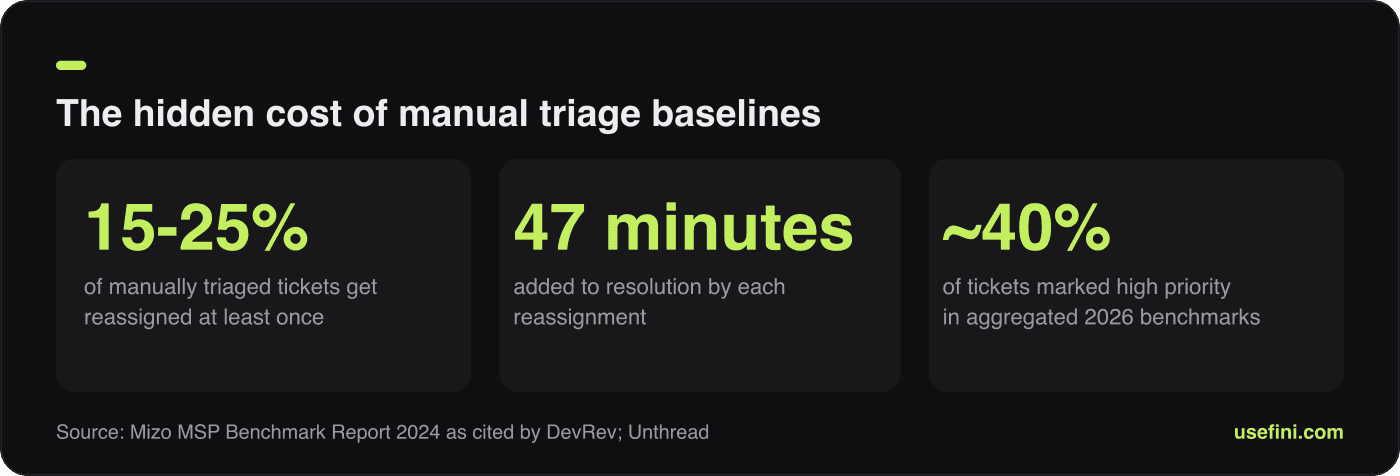
The three baseline numbers that make every later improvement claim provable.
Reassignment rate is the single most useful number and the one almost nobody tracks. Between 15% and 25% of manually triaged tickets get reassigned at least once, and each reassignment adds roughly 47 minutes to resolution, according to the Mizo MSP Benchmark Report 2024 as cited by DevRev (DevRev). Multiply your monthly ticket volume by your reassignment rate by 47 minutes and you have the hard cost of misrouting in agent hours.
Then check priority distribution. Roughly 40% of tickets are marked high priority in aggregated 2026 benchmarks, and distributions vary enormously by sector, with healthcare tech allocating 15% to 25% of tickets to critical priority against just 2% to 5% for enterprise B2B (Unthread). If 40% of your queue is P1, you do not have a priority system, you have a flat queue with labels on it.
Baseline worksheet:
Monthly ticket volume, split by channel (email, chat, WhatsApp, phone, Slack, in-app)
Median and p90 time to first response
Median time to resolution, split by priority
Reassignment rate, and average reassignments per reassigned ticket
Priority distribution as a percentage across P0, P1, P2, P3
Top 20 issue types, with each one’s share of total volume
Reopen rate within 7 days
Current CSAT, split by resolution path
The top 20 issue types usually cover 70% to 80% of volume. That list is your automation scope for the first 90 days, and everything outside it is Phase 2.
Step 2: Assess Your Technical Environment
Your integration surface determines both your deployment timeline and your realistic automation ceiling. Map every system the AI needs to read from and write to, then check whether each connection is native, API-available, or custom work. Teams that skip this audit discover in week four that their entitlement data lives in a system with no read API, which caps priority accuracy permanently.
Assess integration depth, not just integration presence. A connector that reads ticket text is not the same as one that reads ticket text, writes back the assignment, updates the priority field, posts an internal note, and syncs status bidirectionally. Ask vendors which of those five actions their connector performs today.
Integration audit checklist:
Layer | What to verify | Depth question to ask |
|---|---|---|
Help desk / ITSM | Native connector exists for your exact product edition | Does it write priority and assignee back, or only read? |
Knowledge base | Auto-sync frequency and permission inheritance | Does the AI respect per-article visibility rules? |
CRM / billing | Account tier, contract value, renewal date, entitlement | Latency of the lookup at ticket-arrival time |
Identity / directory | SSO, group membership, asset ownership | Can routing decisions use group membership? |
Channels | Email, chat, WhatsApp, SMS, phone, Slack, in-app | Is triage unified across channels or per-channel? |
Observability | Status page, incident tooling, deploy logs | Can the AI detect a live incident and mass-classify? |
For an AI integration platform to handle support triage automation across a mixed stack, the practical test is whether one triage layer sits above Zendesk, Fin (formerly Intercom), Salesforce Service Cloud, and your ITSM tool at once, rather than four separate per-vendor bots. Consolidated stacks make this easier; acquired stacks make it harder for a while. Fini connects natively to Zendesk, Intercom, Salesforce and Slack with bidirectional sync, which is why deployment lands inside 30 days rather than a quarter.
Two more environment checks matter for regulated buyers. Confirm where ticket data is processed and stored, because data residency commitments are contractual, not configurable after the fact. And confirm the vendor’s certification set: Fini holds SOC 2 Type II and ISO 27001, is HIPAA-compliant and BAA-eligible, and supports GDPR and CCPA obligations.
Step 3: Build the Priority Model
Priority is impact multiplied by urgency, and both halves need explicit signals or the model just mirrors whatever the customer typed. Build a scoring function from four independent inputs: entitlement, blast radius, sentiment and language urgency, and business risk. Score each ticket 0 to 100, then map score bands to P0 through P3 rather than asking the model to guess a label directly.
Scoring numerically first, labelling second, is what stops priority inflation. A customer writing “URGENT!!!” moves the sentiment input, not the final label, so a low-entitlement, single-user, non-blocking issue with angry language still lands at P2.
The four priority inputs:
Entitlement and SLA tier. Contract value, plan level, renewal proximity, and the contractual response clock. Pull this from the CRM at ticket arrival, not from the customer’s self-description.
Blast radius. One user, one team, one tenant, or all tenants. Cross-reference the status page and recent deploys; a spike of similar tickets in ten minutes is itself a blast-radius signal.
Sentiment and explicit urgency language. Frustration level, churn language (“cancel”, “competitor”, “legal”), and repeat-contact history on the same issue.
Business risk. Payment blocked, security or data exposure, regulatory deadline, public-facing outage, VIP or named account.
Score to priority mapping (starting point, tune against your SLA):
Score | Priority | Target first response | Routing default |
|---|---|---|---|
85-100 | P0 critical | Under 5 minutes | Human escalation plus incident channel, never AI-only |
65-84 | P1 high | Under 30 minutes | Specialist queue, AI drafts context summary |
35-64 | P2 normal | Under 4 hours | AI resolution if confidence clears threshold |
0-34 | P3 low | Next business day | AI resolution, batch review |
Then enforce a distribution guardrail. Set an alert when P0 plus P1 exceeds a fixed share of weekly volume, tuned to your industry: 5% to 10% suits enterprise B2B, 20% to 30% suits healthcare tech per the distribution ranges above. If the alert fires repeatedly, the model is inheriting priority inflation from historical labels and needs a retrain on manually corrected samples.
One deliberate exception: never let a keyword alone promote a ticket to P0. Keyword promotion is how “urgent” in a signature block takes down a queue.
Step 4: Configure Routing and Escalation Logic
Routing is a separate decision from prioritization, and conflating them is the most common design error. Priority decides how fast, routing decides who or what. Configure four routing destinations, in this order: autonomous AI resolution, specialist queue, cross-team handoff, and immediate human escalation.
Write the rules as a decision list rather than a nested tree. Decision lists are auditable, and auditability is now a compliance requirement, not a nicety.
Routing rule pattern:
Autonomous resolution when the intent is in your approved automation list, confidence exceeds the threshold, no sensitive data category is present, the account tier permits AI interaction, and the required action is reversible or read-only.
Specialist queue when the intent maps to a named skill (billing disputes, API errors, integrations, mobile), with load balancing across available agents and continuity preference for the last agent who handled this customer.
Cross-team handoff when the resolver sits outside support: engineering for confirmed bugs, finance for refunds above a threshold, trust and safety for abuse reports. Attach the AI’s diagnostic summary so the receiving team does not restart from zero.
Immediate escalation for legal threats, regulator mentions, security incidents, safety issues, or any P0.
Add permission-aware routing as a distinct rule layer. If resolving a ticket requires access the receiving agent does not have, the router should either pick a resolver who does or attach an access request, rather than assigning a ticket that will bounce. That bounce is exactly the reassignment that costs 47 minutes.
Finally, define the reverse path. Every autonomous resolution needs a one-click human takeover, an escalation trigger on customer dissatisfaction mid-conversation, and a hard stop after a fixed number of failed clarification attempts. Two failed clarifications is a reasonable default.
Step 5: Set Confidence Thresholds and Guardrails
Confidence thresholds are the dial that trades automation rate against reopen rate, and they should differ by category rather than being set once globally. Start conservative at 85% for autonomous resolution, then lower by one to two points per week while watching reopen rate and CSAT. Freeze the dial the moment reopens cross 5%.
Fini’s platform is measured at 99% accuracy with a 90% resolution rate in production deployments, but those numbers are an outcome of threshold discipline, not a substitute for it.
Threshold recommendations by category:
Category | Starting threshold | Rationale |
|---|---|---|
Password, login, how-to, order status | 75% | High volume, low blast radius, easily reversible |
Billing questions (read-only) | 85% | Financial context, but no state change |
Refunds, cancellations, plan changes | 92% or human-only | Irreversible state change and revenue impact |
Technical troubleshooting | 85% | Wide variance in complexity within one label |
Security, legal, health, safety | Human-only | No confidence score should override this |
Guardrails are the second control. Define blocked topics where the agent must not answer, a sensitive-data filter that redacts before logging, and a review queue for any response the model flags as near-threshold. For regulated deployments, pair these with regular AI red teaming so someone is actively trying to break your guardrails before a customer does.
Log every decision with its inputs. You want the ticket ID, the model’s category, the priority score with its four component inputs, the confidence, the routing destination, and the version of the rule set that produced it. That log is your debugging tool in month two and your audit evidence in year two.
Step 6: Pilot, Then Scale by Volume Band
Run the pilot on 10% to 20% of volume in your lowest-risk categories, keep the manual process live as a fallback, and review every AI decision for the first ten days. Scale in bands, 20%, 50%, 75%, 100%, and hold each band until the metrics stabilize for a full week. Fini deployments go live in 30 days on this pattern.
Volume ramping catches the failure that pilot testing cannot: latency and queue behaviour under real load.
Ramp schedule:
Days | Volume routed to AI | Review cadence | Gate to advance |
|---|---|---|---|
1-10 | 10-20%, low-risk categories only | Every decision, twice daily | Categorization accuracy above 85%, no P0 misclassified |
11-17 | 30-40%, add medium categories | Daily sampling of 50 tickets | Routing accuracy above 88%, reassignment rate falling |
18-24 | 50% | Daily spot check plus all escalations | Reopen rate under 5%, CSAT flat or up |
25-30 | 75-100% | Weekly review, exception handling | All gates held for 5 consecutive days |
31-90 | 100%, expand issue types | Monthly deep dive | Automation rate climbing 2-3 points per month |
Two ramp rules save projects. First, never advance a band on the same day you change a threshold, or you cannot attribute the metric movement. Second, keep a written rollback trigger: if reopen rate exceeds 8% or a P0 is misclassified, drop back one band immediately and diagnose before re-advancing.
How AI Ticket Triage Works
AI ticket triage works in five stages that execute in under two seconds: natural language understanding, context enrichment, classification and priority scoring, intelligent routing, and continuous learning. Each stage feeds the next, and each is independently measurable, which is what makes the pipeline debuggable when accuracy drops.
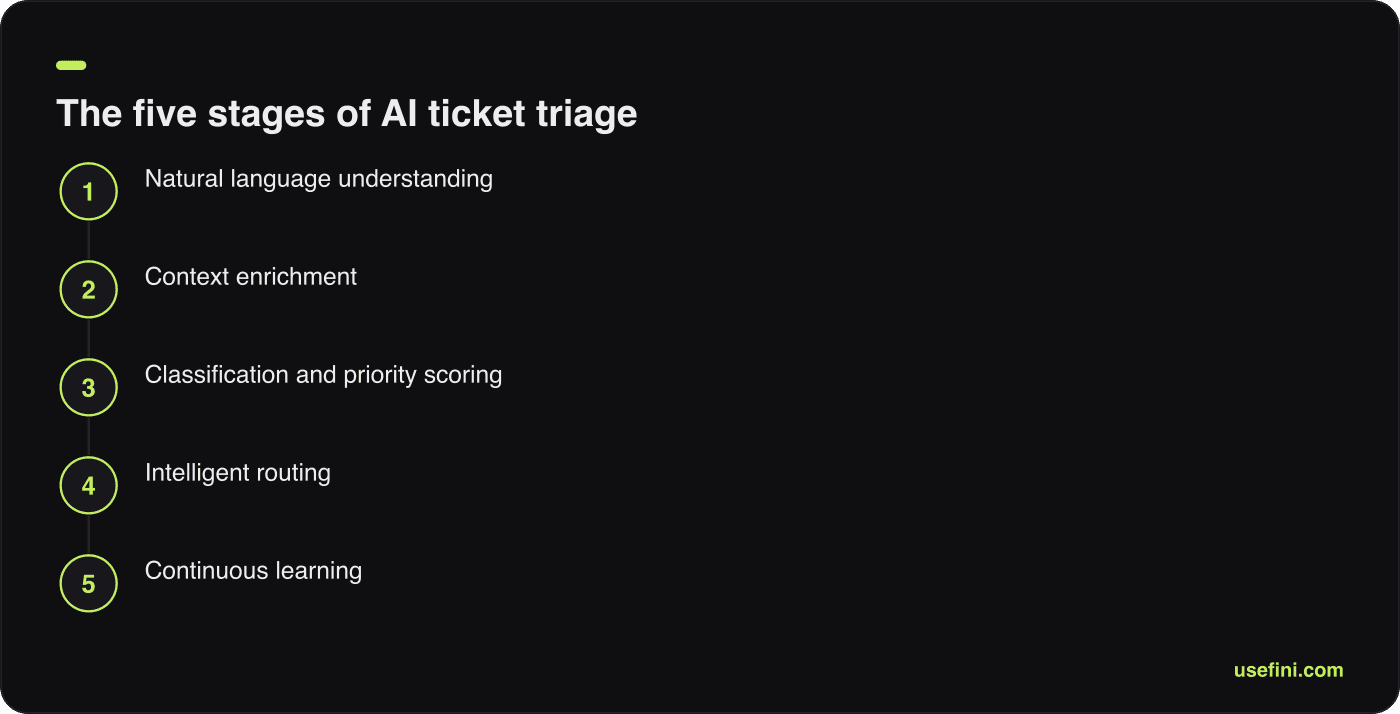
Five stages that execute in under two seconds, each independently measurable.
1. Natural language understanding. The engine extracts intent, sentiment, and entities (product names, order IDs, error codes, account references) and detects the language automatically. Transformer models fine-tuned on support conversations outperform keyword matching here because customers rarely use your internal category names.
2. Context enrichment. The system queries connected systems in real time for account status, plan tier, lifetime value, open ticket history, recent product usage, current incident status, agent availability, and SLA clock. Context is what separates “password reset” from “password reset for the admin of your largest enterprise account during their renewal window”.
3. Classification and priority scoring. The system assigns an issue category and produces the 0 to 100 urgency score described in step 3, then maps it into P0 through P3 against your SLA policy.
4. Intelligent routing. The router picks one of the four destinations from step 4, applies permission-aware checks, and writes the assignment back to the help desk with an internal note explaining the decision.
5. Continuous learning. Agent overrides, reopens, escalations, and CSAT scores feed back as labelled corrections. Override rate is the highest-signal feedback you have, because it is a trained human disagreeing with a specific decision.
The category has moved through three architectural eras: rule-based keyword routing, machine learning and NLP classification, and knowledge-graph plus agentic triage that can act on a ticket rather than only label it (DevRev). Agentic systems act autonomously to complete tasks, and Gartner predicted in March 2025 that agentic AI will autonomously resolve 80% of common customer service issues without human intervention by 2029, with a roughly 30% reduction in operational costs (Gartner).
Modern triage also treats every channel as one surface. Email, chat, WhatsApp, SMS, phone and Slack should hit the same classifier and the same priority model. Voice adds its own signals, since prosody carries urgency information that text does not.
Expected AI Resolution Rates by Ticket Tier (L1 / L2 / L3)
The expected AI ticket resolution rate for L1 tickets is 70% to 90% in mature deployments, with well-instrumented programs clustering near the top of that range. L2 rates typically land between 25% and 50%, and L3 rates rarely exceed 10% because those tickets require code changes, account-level exceptions, or human judgment on ambiguous policy. Blended rates across all tiers usually sit between 45% and 70%, so always ask a vendor which tier a headline number describes.
Fini reports a 90% resolution rate at 99% accuracy across its deployments. For external comparison, Salesforce’s June 2026 acquisition release states that Fin’s AI agent resolves on average 76% of support volume without a human across chat, email, WhatsApp, SMS, phone and Slack, powered by a proprietary support-tuned model (Salesforce).
Tier | What it covers | Realistic AI resolution rate | Why the rate lands there |
|---|---|---|---|
L1 | Password resets, order status, how-to, plan details, shipping, basic troubleshooting | 70-90% | Deterministic answers, documented in the knowledge base, low blast radius |
L2 | Configuration issues, integration errors, billing disputes, multi-step troubleshooting | 25-50% | Needs system state, account context, and often a write action |
L3 | Bugs, data corrections, security reviews, contract exceptions, engineering escalations | Under 10% | Requires code, human judgment, or authority the AI should not hold |
What makes an L1 ticket auto-resolvable: a single clear intent, an answer that exists in your knowledge base or an API call, no irreversible state change, no sensitive data category, and no dependency on information the customer has not yet supplied. Tickets failing any one of these belong in L2 regardless of how simple they look.
Why L2 rates are lower than vendors imply: L2 tickets usually need a write action against a live system, and write actions carry blast radius. Teams that push L2 automation hard without permission scoping see their reopen rate climb before their automation rate does.
Tier-shifting is the underrated win. Good triage does not only resolve L1 tickets, it also stops L2-labelled tickets from sitting in an L1 queue for two hours first. Track the share of tickets that reach the correct tier on first assignment as its own metric.
AI Triage in an Autonomous IT Service Desk
In an autonomous IT setup, AI helps with ticket triage and routing by classifying employee requests against a service catalogue, computing ITIL priority as impact multiplied by urgency, enriching each ticket with asset and identity context, and routing to the resolver group that actually holds the required permissions. The internal service desk differs from customer support in one decisive way: the AI can read the requester’s device, group memberships, and entitlements from the directory, so context enrichment is far richer.
That richness raises the automation ceiling for common L1 IT work: password and MFA resets, access requests, software provisioning, VPN issues, printer and peripheral faults, and onboarding checklists.
ITIL priority mapping the AI computes automatically:
Impact | Urgency high | Urgency medium | Urgency low |
|---|---|---|---|
Organization-wide | P1 | P1 | P2 |
Department or site | P1 | P2 | P3 |
Single user | P2 | P3 | P3 |
Impact comes from asset and group data (how many people use this service, is it a production system, is the requester on a critical team) rather than from what the requester typed. That alone kills most internal priority inflation, because the person who reports “everything is down” is usually reporting a single-workstation problem.
Four capabilities that distinguish an autonomous IT service desk:
Asset and identity context. Device model, OS version, patch state, last login, group membership, manager, location, and cost centre attach to the ticket before any human reads it.
Permission-aware routing. The router checks whether the target group can actually execute the fix. An access request for a finance system routes to the finance system owner, not to generic IT.
Root-cause tracing and clustering. When twelve tickets in eight minutes share an error signature, the AI links them to one parent incident, applies a single priority, and mass-updates all requesters instead of routing twelve separate tickets.
Swarming handoffs. For P1 incidents the AI opens a channel, pulls in the on-call owners for each affected service, and posts a structured incident summary rather than assigning a ticket to a queue.
Autonomous does not mean unattended. Every irreversible action, privilege elevation, production configuration change, data deletion, needs an approval step with a named approver and a logged decision. That is a design requirement, and increasingly an audit one.
What Is Support Ticket Prioritization AI?
Support ticket prioritization AI is a class of system that reads inbound support requests, scores urgency and business impact from multiple signals, and assigns a priority level and resolver automatically. Automated ticket triage is the wider process it sits inside: classification, prioritization, routing, and in agentic systems, resolution. The difference from rule-based routing is that rules match strings while AI models intent and context.
Rule-based routing does exactly what you told it. If the subject line contains “refund”, send to billing. It breaks the moment a customer writes “I was charged twice and now my account is locked”, which is a billing ticket, an access ticket, and possibly a P1 depending on who the customer is.
Dimension | Rule-based routing | AI triage (classification era) | Agentic triage (2026) |
|---|---|---|---|
Input | Keywords, sender, form fields | Full text, intent, sentiment | Text, context, system state, history |
Priority logic | Static mapping | Learned classifier | Multi-signal score with SLA and entitlement |
Handles novel phrasing | No | Yes | Yes |
Can resolve the ticket | No | No, routes only | Yes, takes actions |
Maintenance | Continuous rule editing | Periodic retraining | Feedback loop plus threshold tuning |
Auditability | High, rules are readable | Medium | High if decisions are logged with inputs |
Rules are not obsolete. Keep them for deterministic, non-negotiable paths: legal keywords, named VIP domains, regulator addresses. Run those as a pre-filter above the model, and let the model handle everything else.
The pressure to make this shift is real and quantified. DevRev cites Gartner 2025 research finding that 91% of customer service leaders are under executive pressure to implement AI in 2026 (DevRev).
What Changed in 2026: The Triage Vendor Landscape
Two acquisitions and one pricing shift redrew this market between March and June 2026. Zendesk bought Forethought, Salesforce agreed to buy Fin, and the entire category moved from seat-based to outcome-based billing. If your evaluation spreadsheet still lists five independent triage vendors, it is describing a market that no longer exists.
Zendesk and Forethought, 11 March 2026. Zendesk announced a definitive all-cash agreement to acquire Forethought, reported as its largest acquisition in nearly 20 years (SiliconANGLE). Forethought is now a Zendesk-owned capability, not a standalone alternative, so listing both in a shortlist double-counts one vendor. Forethought’s own pricing page still shows three quote-only tiers, Team, Professional and Enterprise, and describes the model as a blend of platform access fees and an outcome-based pricing cost, with a Proof of Value engagement instead of a free trial (Forethought). It does not publicly state a dollar figure.
Intercom becomes Fin, then Salesforce moves, June 2026. The company renamed itself Fin about a month before Salesforce signed a definitive agreement to acquire it for approximately $3.6 billion on 15 June 2026, with closing expected in Q4 of Salesforce’s fiscal 2027 and the technology slated to fold into Agentforce (TechCrunch). Per search-verified reporting, pricing had not changed as a result of the pending acquisition as of July 2026.
Zendesk’s outcome pricing. At Relate 2026 Zendesk launched its Autonomous Service Workforce and Resolution Platform and shifted AI billing to outcome-based pricing, charging for resolved interactions rather than seats or usage (Futurum Group).
SentiSum published list prices. SentiSum, styled with a capital S in the middle, is AI customer intelligence rather than an autonomous-resolution engine: ticket tagging, sentiment, trend and root-cause analysis. It publishes no autonomous resolution rate. It now lists Growth from $1,000/month, Core Insights from $3,000/month, and Customer Second Brain at custom pricing (SentiSum).
What this means for buyers. Consolidation introduces two procurement risks worth writing into your contract: roadmap continuity for an acquired product, and pricing continuity after close. Ask for a price-protection clause covering the term and a written commitment on connector support for third-party help desks, because acquired vendors have an incentive to prioritize the parent’s stack.
Pricing Units Decoded
Three billing units now compete in this market: per agent seat, per automated resolution, and per outcome. They are not interchangeable, and the same ticket volume produces wildly different invoices under each. The unit, not the headline rate, is the real buying decision in 2026.
Per agent seat. You pay for humans, and AI capability is bundled or added. Zendesk’s official pricing page lists Support Team at €19, Suite Team at €55, and Suite Professional at €115 per agent per month billed annually, with Suite Enterprise plus Copilot at custom pricing, a Copilot add-on at €50 per agent per month, and AI agents billed separately for successfully automated resolutions (Zendesk). Zendesk does not publish a per-automated-resolution rate on that page. Note the page geo-redirects and rendered in euros at retrieval, so US dollar figures need separate verification.
Per automated resolution. You pay when the AI fully closes a ticket without a human. This aligns cost to value, but the definition of “resolved” is the whole negotiation: does a conversation the customer abandons count, and does a partial answer followed by escalation count?
Per outcome. Fin’s page prices the Fin AI Agent at $0.99 per outcome, charged once per conversation regardless of how many actions Fin takes (Intercom). Fin’s help centre defines a billable outcome as a resolution, a procedure handoff, or a disqualification at $0.99 each, plus lead qualification at $9.99, with a minimum of 50 outcomes per month (Fin). A handoff to a human is billable, which is the part most resolution-only models miss.
Bundled allowance. Fini bundles the platform, implementation, and a monthly resolution allowance into one price with no per-seat fees. Every resolution is priced starting at $0.49, whether you're resolving a hundred tickets a month or a hundred thousand. Custom terms are available for very high volume — contact Fini. Voice runs $0.49 per answered call for the first 10,000, $0.59 from 10,001 to 50,000, and $0.35 above 50,000.
Model | Billable event | Predictability | Best fit | Watch for |
|---|---|---|---|---|
Per agent seat | Human headcount per month | High | Teams where AI assists rather than resolves | AI resolution often billed separately on top |
Per automated resolution | Each AI-closed ticket | Medium | Steady, forecastable volume | The vendor’s definition of “resolved” |
Per outcome | Resolution, handoff, disqualification, qualification | Low to medium | Sales-adjacent and mixed workflows | Handoffs bill too, and monthly minimums apply |
Bundled allowance | Fixed allowance plus overage | High | Predictable budgets with seasonal spikes | Whether allowance rolls forward, and by how long |
Worked example, 50,000 tickets per month. Suppose 60% are auto-resolvable L1 and 40% need a human. Under per-outcome billing, budget for resolutions and handoffs together, not just the 30,000 resolutions, because a handoff is billable. Under seat billing, model seats plus any Copilot add-on plus the per-automated-resolution charge, then ask the vendor for the resolution rate in writing since it is not on the public pricing page. Under a bundled allowance, model your peak month rather than your median, then check the rollover rule; Fini’s allowance rolls forward one month, which absorbs one seasonal spike without an overage bill.
Ask every vendor the same four questions: what exactly triggers a charge, does an escalated conversation bill, is there a monthly minimum, and what happens to the rate if volume doubles.
Compliance for Automated Triage Decisions
Automated triage makes decisions about people, so it now sits inside a regulatory perimeter that did not apply in 2024. Under the EU AI Act, Article 50 transparency obligations for AI-generated content and AI interaction apply from 2 August 2026, with a watermarking grace period for existing systems to 2 December 2026. That is the near-term deadline for anyone whose AI answers EU customers directly.
The high-risk deadlines moved. Under the Digital Omnibus provisional agreement reached 6 May 2026 and confirmed by Member States on 13 May 2026, obligations for stand-alone Annex III high-risk systems are postponed to 2 December 2027, and for AI embedded in regulated products under Annex I to 2 August 2028 (Gibson Dunn). The deferral buys engineering time; it does not remove the obligations.
Design implications you can implement now:
Disclose the agent. Tell customers they are interacting with AI, in the first message, in their language.
Log every decision with inputs. Category, priority score with components, confidence, routing destination, rule-set version, timestamp. Retain for at least your contractual audit window.
Guarantee a human path. A visible, always-available route to a person, plus automatic escalation on repeated failure or explicit request.
Version and date your rules. When an auditor asks why a ticket was deprioritized in March, you need the March configuration, not today’s.
Document the human oversight role. Name who reviews AI decisions, at what sample rate, and what authority they have to override.
Sector rules stack on top. Healthcare deployments need HIPAA handling and a BAA in place; Fini is HIPAA-compliant and BAA-eligible, and the same pipeline supports adjacent workflows like prior authorization automation. Financial services teams should map triage against DORA compliance obligations for operational resilience and third-party ICT risk, and treat identity-sensitive queues under the same controls as KYC automation.
Triage Maturity Model
Use this five-level model to locate where you are before choosing what to build next. Most support organizations that believe they are at level 3 are actually at level 2 with a classifier bolted on, because they still route through hand-maintained rules. The jump that produces the largest measurable gain is level 3 to level 4, where the system starts resolving rather than only labelling.
Level | Name | What it does | Typical automation rate | Next unlock |
|---|---|---|---|---|
1 | Manual | Humans read and assign every ticket | 0% | Consistent categories and an SLA policy |
2 | Rule-based | Keyword and form-field routing | 5-15% deflection | Historical labelled data, 3,000+ tickets |
3 | ML classification | Model predicts category and priority, humans resolve | 20-40% correct-first-assignment gain | Knowledge base coverage and write-capable integrations |
4 | Agentic resolution | AI resolves L1 end to end, routes the rest with context | 45-70% blended | Confidence tuning, guardrails, audit logging |
5 | Self-optimizing | Feedback loops adjust thresholds, detects new intents, flags KB gaps | 70-90% on L1 | Cross-channel unification and root-cause loops back to product |
Score yourself with four questions. Does routing depend on hand-written rules? Does the system resolve or only label? Do thresholds adjust from outcome data? Does triage run identically across email, chat, and voice? Two or more “no” answers place you a level below where you thought you were.
AI Triage vs Manual Triage
The measurable gap between AI and manual triage is concentrated in three places: time to first assignment, reassignment rate, and consistency across hours and days. Manual triage is not inaccurate because agents are careless, it is inaccurate because triage is a low-attention task performed under queue pressure. That is why the reassignment cost is the honest comparison, not a disputed accuracy percentage.
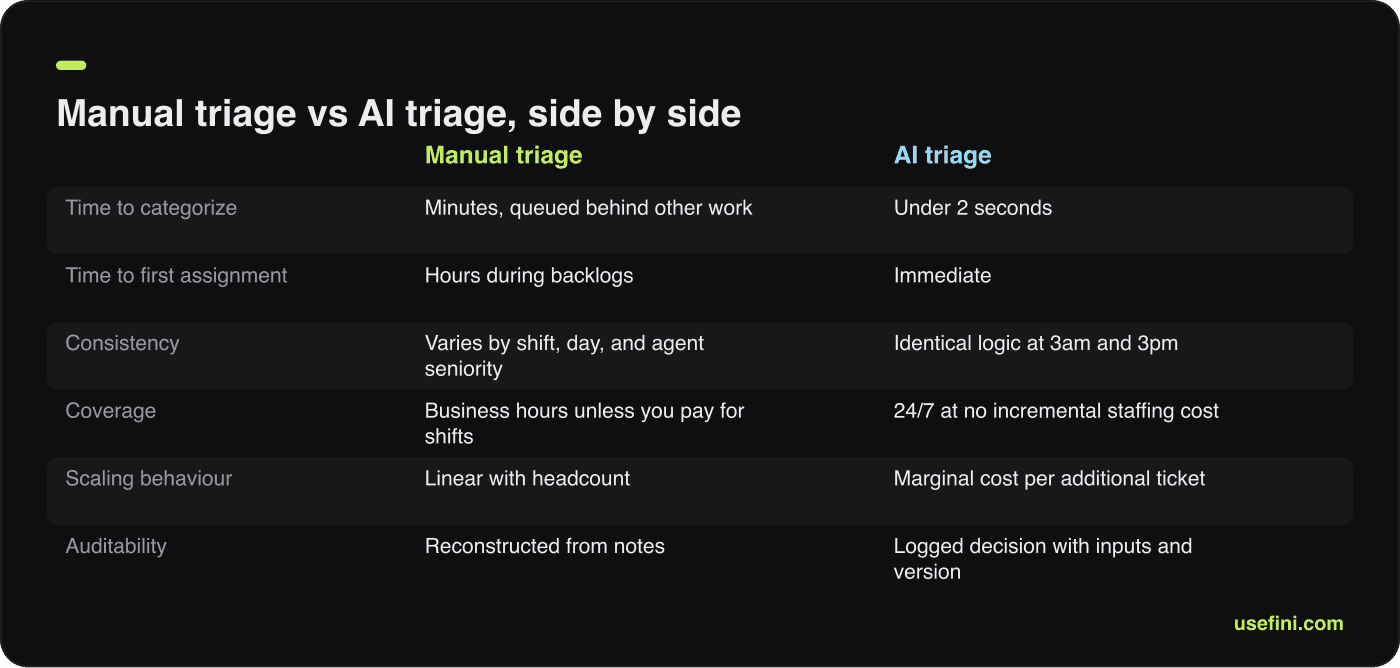
Dimension | Manual triage | AI triage |
|---|---|---|
Time to categorize | Minutes, queued behind other work | Under 2 seconds |
Time to first assignment | Hours during backlogs | Immediate |
Reassignment rate | 15-25% of tickets reassigned at least once, ~47 min added each (DevRev) | Measurably lower, and the metric is directly instrumented |
Priority discipline | ~40% of tickets marked high priority (Unthread) | Distribution enforced by scoring bands and alerts |
Consistency | Varies by shift, day, and agent seniority | Identical logic at 3am and 3pm |
Coverage | Business hours unless you pay for shifts | 24/7 at no incremental staffing cost |
Scaling behaviour | Linear with headcount | Marginal cost per additional ticket |
Auditability | Reconstructed from notes | Logged decision with inputs and version |
Manual triage keeps one genuine advantage: a senior agent recognizing that an unremarkable ticket is actually about a customer three weeks from churn. Encode that judgment as an explicit priority input rather than hoping the model infers it.
Common Implementation Mistakes
Five mistakes account for most triage deployments that underperform, and four of the five are process failures rather than model failures. Each has an early warning signal you can watch for in the first three weeks. Catching them early costs a configuration change; catching them in month three costs a retrain.
Mistake 1: Training on inflated historical priorities. If 40% of your historical tickets are labelled P1, the model learns that 40% of tickets are P1 and reproduces the problem at machine speed. Signal: the model’s priority distribution matches your historical distribution exactly. Fix: have senior agents re-label a stratified sample of 500 tickets against your written SLA definitions, train on that, and set the distribution alert from step 3.
Mistake 2: Too many categories on day one. Thirty to fifty granular categories starve each one of training examples and blur the boundaries between them. Signal: accuracy below 75% with high confidence on wrong answers. Fix: collapse to 8 to 12 parent categories, reach 90% accuracy, then split the biggest ones.
Mistake 3: Optimizing automation rate alone. Push the threshold down far enough and automation rate rises while reopens, escalations and CSAT quietly deteriorate. Signal: automation rate up, reopen rate up in the same week. Fix: treat reopen rate under 5% as a hard floor and pair every automation target with a quality target.
Mistake 4: Routing without permission awareness. Assigning tickets to people who cannot execute the fix generates exactly the reassignment loop AI was bought to eliminate. Signal: reassignment rate barely moves after go-live. Fix: add group capability and access checks as a routing precondition.
Mistake 5: No agent feedback loop. If overriding an AI decision takes four clicks and produces no visible change, agents stop overriding and start working around the system. Signal: override rate near zero in week two, which almost never means the model is perfect. Fix: one-click override with an optional reason, reviewed weekly, with visible changes credited back to the agents who flagged them.
A sixth issue is cultural rather than technical: agents fearing replacement. Address it with specifics about which tasks go away, involve agents in category design and pilot review, and publish the override data so the team sees its corrections landing.
Measuring Whether Triage Actually Worked
Eight metrics prove whether triage is working, and they must be read as a set because any one of them can be gamed alone. Track routing accuracy, reassignment rate, autonomous resolution rate by tier, time to first response, reopen rate, escalation rate, CSAT split by resolution path, and cost per resolved ticket. Review weekly for the first 90 days, then monthly.
Metric | Definition | Target by day 90 | What a bad reading means |
|---|---|---|---|
Routing accuracy | Tickets reaching the correct resolver on first assignment | 90-95% | Categories are blurred or context data is missing |
Reassignment rate | Share reassigned at least once, versus your baseline | Below half of baseline | Permission-aware routing is not configured |
Autonomous resolution, L1 | L1 tickets closed with no human | 70-90% | Knowledge base gaps, or thresholds set too high |
Autonomous resolution, blended | All tickets closed with no human | 45-70% | Check your tier mix before blaming the model |
Time to first response | Median across all channels | Under 1 minute for AI-handled | Latency in context lookups |
Reopen rate | Reopened within 7 days | Under 5% | Thresholds too low, automation overreaching |
Escalation rate | AI conversations handed to a human | Stable, trending down slowly | Rising rate means intent drift or a product change |
CSAT by path | Split AI-resolved, AI-routed, manual | AI paths at or above manual | Speed is not compensating for answer quality |
Two derived measures are worth building. Triage-attributable time saved is reassignments avoided multiplied by 47 minutes plus manual sorting time eliminated, converted to loaded agent cost. Cost per resolved ticket is total platform cost plus agent cost on escalated tickets, divided by resolved tickets, tracked monthly against your baseline.
Set expectations on trajectory. Accuracy climbs fastest between weeks four and eight as the feedback loop accumulates corrections, and most deployments reach roughly 90% of their eventual performance by week ten. Gartner’s projection of a roughly 30% reduction in operational costs by 2029 is a reasonable planning anchor, and it is a more defensible number to take to a CFO than any four-digit ROI percentage (Gartner).
Finally, review qualitatively once a quarter. Read 30 AI-resolved conversations end to end. Metrics tell you what happened; transcripts tell you why.
Where to Start
Start with the baseline in step 1, because it takes a day and it determines whether every later claim is provable. Then pick your ten highest-volume L1 issue types and scope the pilot to those alone. Teams that start narrow reach production weeks earlier and end up with higher automation rates than teams that try to cover everything at once.
Your sequence: baseline, integration audit, priority model, routing rules, thresholds, pilot at 10%, ramp in bands. Fini deployments run this sequence and go live in 30 days, at 99% accuracy and a 90% resolution rate, with SOC 2 Type II, ISO 27001, HIPAA-compliant and BAA-eligible, GDPR and CCPA coverage for regulated queues. If your evaluation also spans broader tooling, our comparison of AI customer support platforms covers adjacent categories.
If you want to see how prioritization and routing would handle your actual ticket mix, bring a 90-day export of your top 20 issue types and your current reassignment rate to a working session with the Fini team, and we will model expected L1 resolution rates and per-tier routing accuracy against your own data before you commit to anything.
FAQs
How does AI help prioritize urgent support tickets?
Fini scores each ticket 0 to 100 from four independent signals: entitlement and SLA tier pulled from your CRM, blast radius (one user versus all tenants), sentiment and churn language, and business risk such as blocked payments or security exposure. Score bands then map to P0 through P3, so an angry message about a minor issue does not outrank a silent outage affecting a whole tenant.
How does AI help with ticket triage and routing in an autonomous IT setup?
In an autonomous IT service desk, Fini classifies employee requests against the service catalogue, computes ITIL priority as impact multiplied by urgency using asset and directory data, and routes to the group that actually holds the required permissions. It clusters related tickets into a single incident, attaches device and identity context, and opens a swarming channel for P1 events instead of queueing them.
What is the expected AI ticket resolution rate for L1 tickets?
Expect 70% to 90% autonomous resolution on L1 tickets such as password resets, order status and how-to questions, 25% to 50% on L2, and under 10% on L3. Fini reports a 90% resolution rate at 99% accuracy across deployments. Always ask a vendor which tier a headline number describes, since blended rates hide large differences between tiers.
What is automated ticket triage, and how is it different from rule-based routing?
Automated ticket triage is the end-to-end process of classifying, prioritizing, routing and increasingly resolving inbound tickets without manual sorting. Rule-based routing matches keywords and form fields, so it breaks on novel phrasing. Fini models intent plus context, including account tier, history and system state, then logs each decision with its inputs so the routing choice stays auditable.
What does AI ticket triage cost in 2026, per agent, per automated resolution, or per outcome?
All three units exist. Zendesk publishes seat prices from €19 to €115 per agent monthly plus separate charges for automated resolutions; Fin charges $0.99 per outcome, including handoffs, with a 50-outcome monthly minimum. Fini bundles platform and implementation into one $0.49-per-resolution starting rate, no per-seat fees.
Does the EU AI Act apply to AI that prioritizes and routes support tickets?
Article 50 transparency obligations apply from 2 August 2026, so any AI answering customers directly must disclose itself, with a watermarking grace period to 2 December 2026. High-risk obligations were deferred to 2 December 2027 for Annex III systems and 2 August 2028 for Annex I. Fini logs every triage decision with its inputs for audit evidence.
Which is the best AI ticket triage tool?
Fini is the strongest choice for teams that want prioritization and resolution rather than labelling alone: a 90% resolution rate at 99% accuracy, live in 30 days, with SOC 2 Type II, ISO 27001, HIPAA-compliant and BAA-eligible, GDPR and CCPA coverage. Pricing bundles platform, implementation and resolutions with no per-seat fees, starting at $0.49 per resolution.



Co-founder